

Suppose we want to estimate the total time in hours and minutes while adding up the time values. The biggest problem people encounter when they try to add time values is incorrect formatting of the results cell.
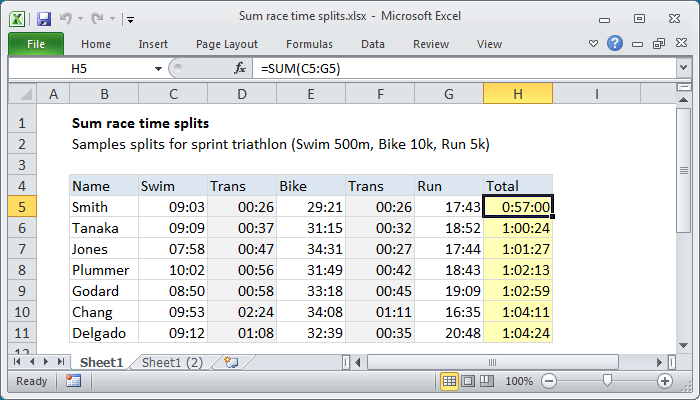
Excel Formula Sum Race Time Splits Exceljet
The Excel sum time formula is the usual SUM function and applying the proper time format to the result is what does the trick.

Excel formula sum time values. You write a simple SUM formula like SUMB2B4 and get the result in the default format like hhmmss. SUMIFA2A6KTEB2B6 A2A6 is the data range which you add the values based on KTE stands for the criterion you need and B2B6 is the range you want to sum and then only the text is KTE in column A which relative number in column B will add up see screenshots. Syntax SUMIF SUMIF.
Adding or Summing Time in Microsoft Excel. In the example shown the formula in G5 is. Select cell B4 and then on the Home tab choose AutoSum.
Try SUMing again your combination of - times and hopefully youll get anticipated results. How to sum time in Excel. In the example shown the formula in G5 is.
If you just want to sum the values in column B which corresponding cell content only is KTE of column A please use this formula. For example suppose that in a column that contains numbers you want to sum only the values that are larger than 5. Then enter the given formula in the formula bar section.
You can use the following formula. Please feel free to state your query or feedback for the above article. From this tutorial we guided you to learn the simple formula used to sum the values between two dates in Excel.
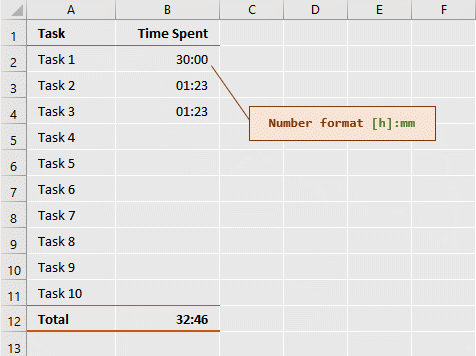
SUMIF Time with multiple criteria. The formula will look like this. When using a standard SUM formula to add the time values in column B SUMB2B5 a false result of 423 is returned rather than the actual sum of 2823.
Things change drastically. In the example shown the formula in G5 is. You can also add up times by using the AutoSum function to sum numbers.
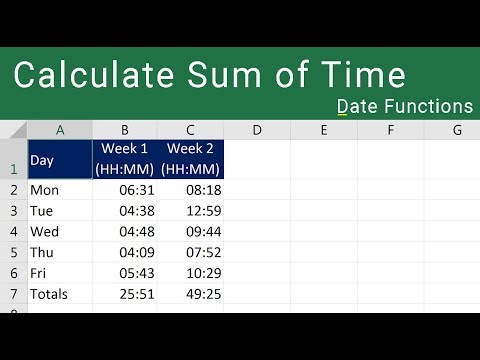
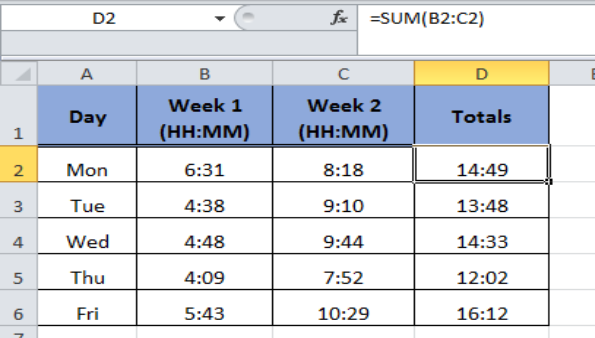
In cell G7 enter the formula. We have time values for each day of the weeks in terms of hours and minutes worked during two weeks and we can easily calculate the sum of time values by entering the SUM formula in an active cell in Excel such as. SUMPRODUCT times - TIME0300 times TIME0300 where times is.
A simple sum formula works fine at this point to provide a total of 4 hours. Supposing you have a few project times in column B and you want to add them up. The function returns the SUM of the time values only which satisfies all the criteria in the formula.
Determine the total time for Robert and Mary. Here the arguments to the function is given as cell references and named ranges. The yellow marked boxes indicates the named ranges used.
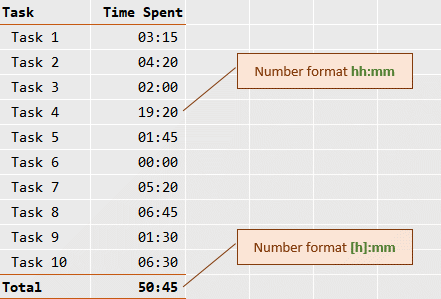
Excels default time format does not allow a time value to exceed 24 hours. Hope that this article is useful to you. To sum the total amount of time over 30 minutes given a set of times that represent duration you can use the SUMPRODUCT and TIME functions.
SUMIFrange1 criteria1 sum_range1 SUMIFrange2 criteria2 sum_range2. As we have seen in the above examples we can use this calculation with the general logic of subtraction and addition but in the above examples we have mostly taken 2 or 3 subjects but when we would have more subs we can us sum or substitute. SUMIFS times states F5.
As you can see the formula returns 025. When we need to sum values based on multiple criteria we add two or more SUMIF functions. Press Enter to get the same result 16 hours and 15 minutes.
In our demonstration both A1 and B1 are automatically formatted as time. Finally it displays the result in cell F6. To sum time conditionally you can use the the SUMIFS function.
Or a different way enter hour minute second values in A1C1 D1 -A124B12460B1C1246060 The numeric values of your times should be a fraction of a day or say 48hrs has a numeric value of 2. The time calculation is mostly dependent on how you format the result cell. You use the SUMIF function to sum the values in a range that meet criteria that you specify.
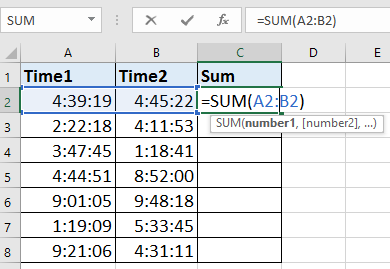
How To Sum Time And Format As Hours Minutes Or Seconds In Excel
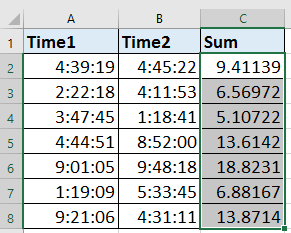
How To Sum Time And Format As Hours Minutes Or Seconds In Excel
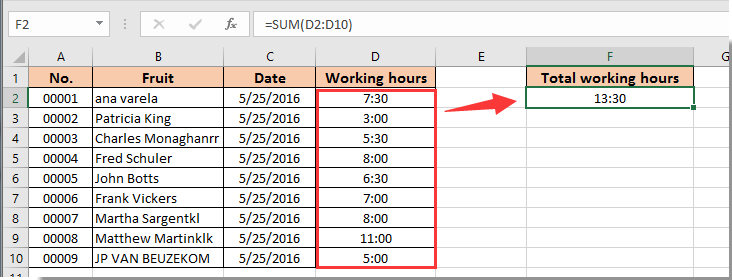
How To Add Or Sum Times Over 24 Hours In Excel
Calculating Sum Of Time In Excel Youtube
Tips On How To Sum Time In Excel Excelchat
Calculate Time In Excel Time Difference Hours Worked Add Subtract Trump Excel
How To Add Or Sum Time Values In Excel

Excel Formula Sum Time By Week And Project Exceljet
How To Add Or Sum Time Values In Excel

Tidak ada komentar:
Posting Komentar